config
Apps/CLIs/configs I use on macOS/iOS. Fish, Karabiner, Cursor..
AI summary
Desktop config
A collection of macOS and iOS configuration files for a custom desktop setup with automation tools.
- stars
- 20.6K
- forks
- 839
- watching
- 448
- awesome list
- 1
- entries
- 121
What's in the list
121 links in 4 sections, with live GitHub stats.activeno commit in 2y
macOS Apps
- Karabiner
is core tool I use to remap my keyboard. It's the tool on which my entire mac workflow is built. All keys on my keyboard are dual purpose keys. Press once, it enters the key, hold together with another key and do custom action. I have 100's of these custom actions all within 1 second of activation for me. i.e. is or opens Safari. See for config
- Alfred
/ for everything search related
- Keyboard Maestro
for all automation needs that are not search related. Both Alfred/Raycast and KM are activated from Karabiner directly. I share all my KM macros . One example of KM macro is to switch . As appearances are switched, the themes get updated accordingly on most apps
- BetterTouchTool
for custom trackpad gestures. Specifically love three finger swipe left/right to move between tabs in . Three finger swipe up to create new tab. Three down to close. Four finger swipe global swipe to show Safari. Four to right to open . Four left to open
- Fantastical
to manage my calendar and events
- CleanShot
for quick editing of screenshots/screencasts
- Transmission
for downloading
- 1Password
to keep all passwords and secret info. I prefer to use Passkeys or Single Sign On via GitHub/Google
- Cursor
as my main code editor. Use many with it. Keep my UI minimal and useful
- Sublime Merge
as visual Git client. It gives nice overview of files changed, what branches exist and more. I have custom actions bound to go through Git tasks fast
- Warp
as primary terminal together with . I also use as side terminal for background servers and things
- Dash
to search APIs fast
- Xcode Beta
to write swift code
- Telegram
as my main messenger. Love its stickers, speed and simplicity
- Discord
as main way to interact with various communities
- Spark
as my email client. Does good job of sorting mail and getting out of my way when writing/replying to things
- Figma
as my primary design tool
- Rive
to do animations
- Spotify
to stream all . Keep all my liked songs in a
IINA
to play video files of movies/series
- Reflect
to write/search notes and my daily journal + tasks
- Linear
to make/check on issues across different teams (I power all GitHub issues of mine through Linear, all in one workspace)
- SnippetsLab
for snippets
- Bike
for thinking through tasks (outlining subtasks fast)
- Yaak
for testing out HTTP requests
- GoLand
preferred editor for Go code together with Cursor
- Safari
as main browser for everything
- Google Chrome Canary
for web development as its are superior to Safari
- Safari Technology Preview
as browser for my / feeds and sometimes dev
iOS Apps
- Fantastical
widget to see today's events, I tap on widget to open app itself to make/search events or see full week/month view of events
- Things
widget to see today's tasks, I tap on widget to open app itself to make/search todos or see other todos for today
- Wikipedia
to read some articles or see in wikipedia
- Google Maps
for navigating/searching the world, saving
- Bluesky
to read/write posts
- Spark
to check on email, don't have notifications set for emails
- Mercury
to transfer money from my main business/personal US banks
- Reddit
to read/make new posts or check on subreddits
- Instagram
to in form of stories/posts (mostly posts)
- GitHub
to make/check on issues/PRs or search for repos
- Linear
to make/check on issues across different teams (I power all GitHub issues of mine through Linear, all in one workspace)
- X
to read/make posts, search and private messages
- Reflect
to write/search notes and my daily journal + tasks
- Slack
to read messages from servers I am in
- Spotify
to stream all and some occasional podcasts/books (prefer Overcast for podcasts)
- Telegram
as my main messenger for private messages/groups + see some channels and use mini apps (use it to transfer TON as payment too)
- Discord
to read messages from servers I am in + private messages
- Perplexity
to make search queries that need some computed answers
- ChatGPT
to ask questions, prefer Claude for general textual queries and real time voice in ChatGPT + O1 thinking model for bigger questions
- top sites
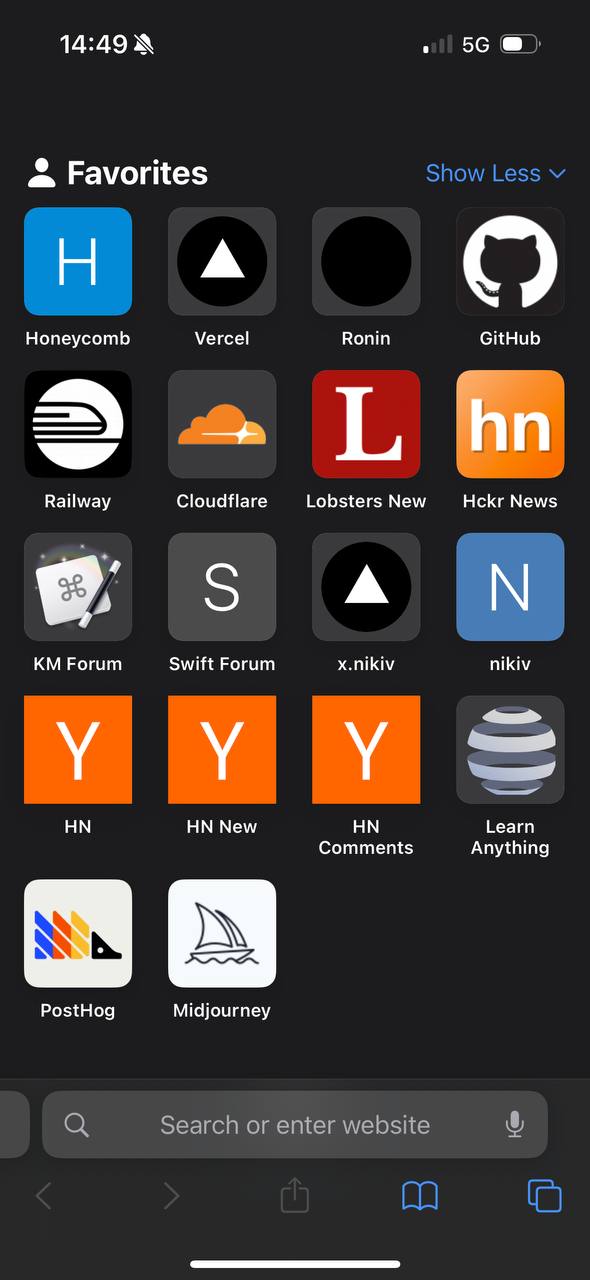
Safari for all web browsing, keep in new tab bookmarks for fast access
- Claude
to ask questions (goto AI model for questions)
- Things
Upcoming widget to see upcoming tasks, open it to enter new upcoming task or edit existing ones
- Skyscanner
to search for flight tickets
- Booking
to search for hotels to stay in
- Airbnb
to search for rooms/places to stay in, sometimes use its experiences curation too
- Glass
to see photos from some dedicated photographers without ads
- Warpcast
too see/make posts in Farcaster
- Mastodon
to read/make posts
- Wise
to transfer money from my main personal EU bank
- Cosmos
to see/makke/save new visual posts
- VSCO
to edit photos
- CapCut
to edit videos
- Pinterest
to see posts and organise them into collections
- YouTube
to see/search videos
- Airchat
to talk with voice on voice only social network
- Threads
to see/post visual content
- TikTok
to see curated feed of videos
- Flighty
widget to see upcoming flights, clicking on widget lets me enter a new flight (if it doesn't get picked up from email automatically)
- Etsy
to buy some items from marketplace
- Amazon
to buy some items from marketplace
- Stripe
to check on incoming transactions or other details
- Twitch
to see past/live streams
- Proxyman
to debug/inspect network traffic on phone (useful for learning how apps work)
- VK
to see posts
- LinkedIn
to see posts or reply/send messages
- Kinopoisk
to see movie/series reviews
- Goodreads
to see book reviews
- WhatsApp
to see/reply to messages sent to me (don't use it as main messenger)
- FilmNoir
to track movies/series I saw on Trakt
- SnipKey
to add new snippets so I can then quickly enter them from special SnipKey keyboard in all text inputs
- Jupiter
to swap some Solana assets fast
- Element X
to see some/reply to messages from groups I am in
- Streaks
widget to see progress at glance or tap on it to see it in detail or mark habits as done
- Trading 212
to buy/sell stocks/ETFs
- Tonkeeper
to send or check on TON transactions or use it to connect to TON dApps
- Sui Wallet
to send or check on Sui transactions or use it to connect to Sui dApps
- Solflare
to send or check on Solana transactions or use it to connect to Solana dApps
- Google Meet
to join/create video meetings
- WebSSH
to SSH connect to my servers on the go and run some commands
- Figma
to check on designs on the go
- Letterboxd
to track movies I saw or want see and check on reviews
- Play 2
to prototype out designs for mobile
- 1Password
to search for all private things (passwords/notes/..)
- Reader
to read articles from RSS feed mostly
- Notion
to see/make pages made in workspaces
- Luma
to track events I am making or want to attend
- Anybox
to check on links I added, use it's share sheet to bookmark things a lot (my fast ingest system from across iOS)
- Wipr 2
as my main ad blocker
- Svadilfari
for in Safari
- Audible
to listen to audio books (opened from shortcut)
- Overcast
to listen to , I love its feature to cut out on silent pauses (opened from shortcut)
- Tailscale
to connect to my exit node server that I use as my VPN in places I need a VPN
- Qewie
to create/share QR codes
iOS Widgets
- Fantastical
Show upcoming event with (on tap opens app)
- Overcast
play current playlist (on tap opens app)
- Things
Create new task with on tap
iOS Shortcuts
- Shortcuts
opens Shortcuts app (so I can fast edit/search shortcuts)
- Translate
opens app (for fast translates of camera or text)
- Draw
opens app (for fast sketching/drawing on the go)
- Phone
opens Phone app (for searching, making new contacts or entering a phone number)
- Places
opens list of options like and on tap opens search for them in
- AI
opens app (nice to ask questions that needs Google know how)
- Workout
opens app to start or view past workouts
- Lens
opens (to know what camera is point at or what the image represents)
- Ride/Food
opens app (to request food or ride)
- Todo
opens with quick entry for creating a todo
- Overcast
instantly start playing the current podcast on my feed
- Tab
opens new tab in Safari
- Audible
opens app to listen to audiobooks
- Voice
starts voice conversation with
- Recordings
opens (to check on recordings I made)
- Listen
opens to listen to books/texts
Nothing in this list matches your filter.
Featured in 1 awesome list
Each link jumps to the spot where the list mentions config.